Intellij IDEA 中国大陆新手常见问题
Intellij IDEA 中国大陆新手常见问题
作为一个 Java、Kotlin 开发新手,本文记录了从新建工程到构建 Jar 及运行的过程中碰到的问题及解决的方法。
- 1、环境
- 2、错误:Plugin … was not found in any of the following sources
- 3、错误:No main manifest attribute 和 Could not find or load main class
- 4、IDEA Kotlin 工程的默认 .gitignore
1、环境
| 软件 | 版本 |
|---|---|
| IntelliJ IDEA | Community Edition 2021.3.2 x64 |
| Java | 16 |
| Kotlin | 1.6.10 |
| Gradle | 7.1 |
2、错误:Plugin … was not found in any of the following sources
完整错误信息
1
2
3
4
Plugin [id: 'org.jetbrains.kotlin.jvm', version: '1.6.10'] was not found in any of the following sources:

Gradle Core Plugins (plugin is not in 'org.gradle' namespace)
Plugin Repositories (could not resolve plugin artifact 'org.jetbrains.kotlin.jvm:org.jetbrains.kotlin.jvm.gradle.plugin:1.2.71') Searched in the following repositories: Gradle Central Plugin Repository
解决办法
中国程序员专享错误,检查网络链接,设置可用的 Proxy 可解,不过 IDEA 的 socks 设置可能与某些客户端不兼容,可以用 socks 转 http 应用来代理,比如:privoxy。
给 privoxy 的主配置文件,最后一行增加:
1
forward-socks5 / 127.0.0.1:8086 .
然后设置 IDEA 的 http proxy 为:127.0.0.1:8118,测试一下网络是否可用。
3、错误:No main manifest attribute 和 Could not find or load main class
如果用的 IDEA 的版本比较新,比如像我用的是 2021.3.2,在构建 jar 包的时候,就会报这个错误,根本原因在于 src 下的目录和之前是不同的。
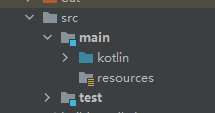
所以如果你使用的还是老办法构建 jar 包,那么这个错误不可避免,老办法一般是这样:
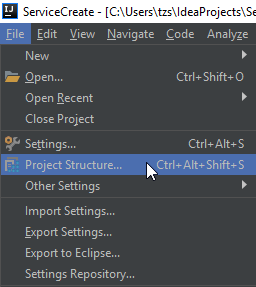
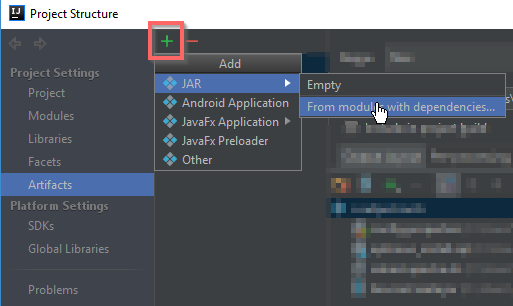
新办法使用了 Gradle 来构建 jar 包:
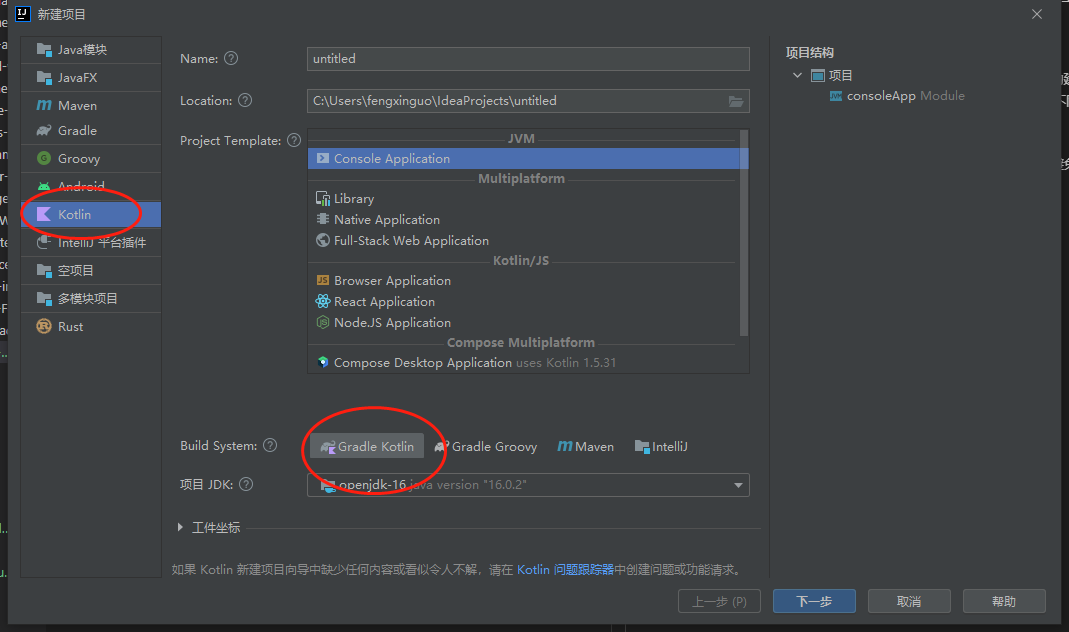
修改文件 build.gradle.kts,增加:
1
2
3
4
5
6
7
8
9
tasks.jar {
    manifest {
        attributes["Main-Class"] = "MainKt"
    }
    configurations["compileClasspath"].forEach { file: File ->
        from(zipTree(file.absoluteFile))
    }
    duplicatesStrategy = DuplicatesStrategy.INCLUDE
}
然后打开 Gradle 工具:
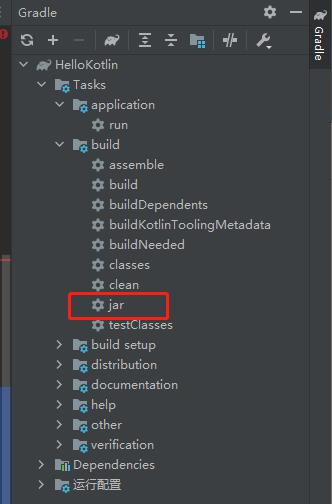
双击开始构建即可。构建完毕,会在 build -> libs 目录下生成 jar 包。这时候再运行 jar 包就不会在报如上错误。
如果 build.gradle 文件不是使用 Kotlin DSL,特征是文件名:build.gradle,不带 .kts,则是使用的 Groovy DSL。
则增加:
1
2
3
4
5
6
7
8
9
10
11
jar {
    manifest {
        attributes "Main-Class": "MainKt"
    }

    from {
        configurations.compileClasspath.collect { it.isDirectory() ? it : zipTree(it) }
    }

    duplicatesStrategy = DuplicatesStrategy.INCLUDE
}
4、IDEA Kotlin 工程的默认 .gitignore
1
2
3
4
5
6
7
/.gradle
/.idea
/out
/build
*.iml
*.ipr
*.iws
本文由作者按照
CC BY 4.0
进行授权